Can You Play Valorant on Mac?
If you are sitting with a MacBook trying to jump into a game with your friends, you have probably realized pretty quickly that Riot does not make this easy. Learn which Intel Macs can run it through Boot Camp and why Apple Silicon, virtual machines, and compatibility tools do not work.
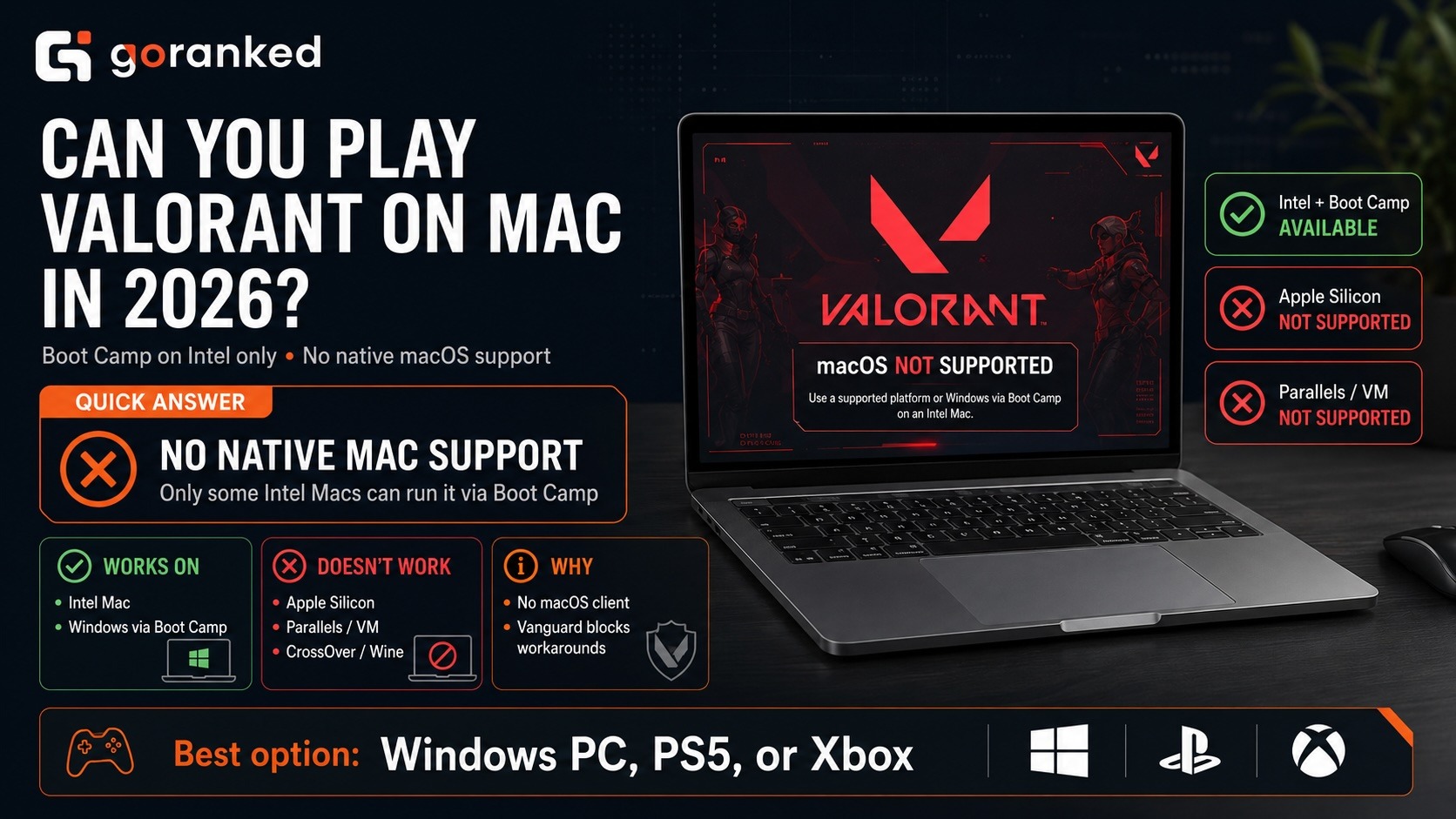
So, can you play Valorant on Mac? No, Valorant does not run natively on macOS because Riot released neither a Mac client nor a compatible Vanguard version. A supported Intel Mac has one escape hatch: boot into Windows through Boot Camp and run the regular PC client.
The distinction between can you play Valorant on Mac and on macOS matters. Boot Camp gives Windows its own partition and boots the Mac into it. Apple Silicon cannot do this, so M-series speed is irrelevant: the game has no compatible environment.
So, can Valorant run on Mac hardware? Sometimes. A suitable Intel model can handle it after switching to Windows; an M-series Mac cannot. That is the real Valorant on Mac 2026 picture, despite the many videos promising a quick Parallels or CrossOver fix.
How to Play Valorant on Mac
Boot Camp is the only route how to play Valorant on Mac worth considering. Vanguard shuts down the easier-looking alternatives.
Boot Camp: useful, but showing its age
Boot Camp puts Windows next to macOS and lets you choose between them at startup. Apple’s model list covers selected MacBook, MacBook Air, MacBook Pro, Mac mini, iMac, iMac Pro, and Mac Pro releases from 2012–2020. Not every Intel Mac qualifies.
Once Windows starts, Valorant sees a normal Windows environment. Hardware still matters: integrated graphics may need Low settings and a reduced resolution, while dedicated graphics should cope better. Expect heat and fan noise during longer sessions.
The awkward part is Windows itself. Apple documents Boot Camp for Windows 10, whose standard support ended on October 14, 2025. It still runs, but without Extended Security Updates it receives no regular security fixes. Windows 11 is not officially supported through Boot Camp, and bypassing its TPM or Secure Boot checks is unreliable.
Why Parallels and CrossOver do not help
Parallels Desktop and VMware Fusion can run Windows on a Mac, but not Valorant. Vanguard needs low-level access and security checks a virtual machine cannot reproduce. Parallels calls the game generally incompatible.
CrossOver, Wine, Whisky, and Apple’s Game Porting Toolkit translate Windows applications instead. Vanguard remains the roadblock. CodeWeavers rates Valorant “Installs, Will Not Run”: reaching the Riot Client does not mean a match will load.
What about cloud gaming?
Valorant is absent from the GeForce NOW catalog, while its Xbox listing is for Series X|S, not Xbox Cloud Gaming. PlayStation streams the PS5 edition only within its own ecosystem. Remote play from a home PC works, but the PC does the work and adds input delay.
But is there a way to play Valorant on Mac without buying another computer? Only when an eligible Intel Mac can serve as the Windows computer. There is no equivalent route for Apple Silicon.
How to Download and Install Valorant on Mac
So, can you download Valorant on Mac? Yes, provided the download happens after an Intel Mac has booted into Windows. Riot does not publish a .dmg file or any other native Mac installer.
Before downloading anything, open Apple menu > About This Mac. Stop if the processor is an Apple M-series chip. If it says Intel, check the model year against Apple’s Boot Camp list.
Prepare the following:
- a backup of files you cannot afford to lose;
- a full 64-bit Windows 10 ISO and licence;
- at least 64 GB of free storage—128 GB is far more comfortable;
- a 16 GB USB drive if Boot Camp asks for one.
How to install Valorant on Mac OS? You cannot install the game in macOS itself. On a compatible Intel Mac, you must create a separate Windows partition through Boot Camp and install the standard Windows version there.
- Open Applications > Utilities > Boot Camp Assistant.
- Choose the Windows ISO and set the partition size. Be generous: Boot Camp cannot resize the partition later, and Windows, Valorant, Vanguard, and updates all need room.
- Allow the Mac to restart. In the Windows installer, choose and format BOOTCAMP. Double-check the name so you do not touch the macOS partition.
- Finish Windows setup, install the Boot Camp drivers, restart, and run the available Windows and Apple updates.
- Visit the official Valorant download page from Windows. Install the Riot Client, sign in, and let it download Valorant and Vanguard.
- Restart once more when prompted, return to Windows, and launch the game through the Riot Client.
To switch between systems later, restart the Mac and hold the Option key during startup. Choose Windows for Valorant or macOS for normal use whenever you need it.
That covers how to download Valorant on Mac hardware: the job happens in the Windows partition, not in macOS. Once you are in, check the Valorant Season 2026 Act 2 changes before entering Competitive.
For steadier performance, start at 1080p with Low settings, close background programs, and keep a MacBook plugged in. Give it airflow too; a blanket will make a warm Intel Mac throttle.
Players who have the game running reliably and want help with Competitive can also explore Valorant rank boosting.
Final Verdict: Does Valorant Work on Mac?
To conclude, does Valorant work on Mac? Yes, but only on compatible Intel models that can boot into Windows. Boot Camp delivers the best Mac-based experience because Valorant runs directly on the hardware instead of inside a virtual machine. The method requires a separate Windows partition, takes up considerable storage, and relies on Windows 10 after the end of its standard support period.
But is Valorant on Mac a native macOS game? No. Riot has not released a Mac client, and even the latest Apple Silicon models cannot launch the game directly.
And is Valorant supported on Mac officially? No. Boot Camp is only a workaround for selected Intel Macs. Apple Silicon devices cannot use it, while Vanguard blocks the game from running through virtual machines and compatibility layers.
If you already own a supported Intel Mac, Boot Camp may be worth trying. Buying an older Mac specifically for Valorant is not. A Windows PC, PS5, or Xbox Series X|S offers a simpler and more reliable experience.
Tags
Articles by this author